

Legal workspace · for your advocate
Signing stops beingthe bottleneck.
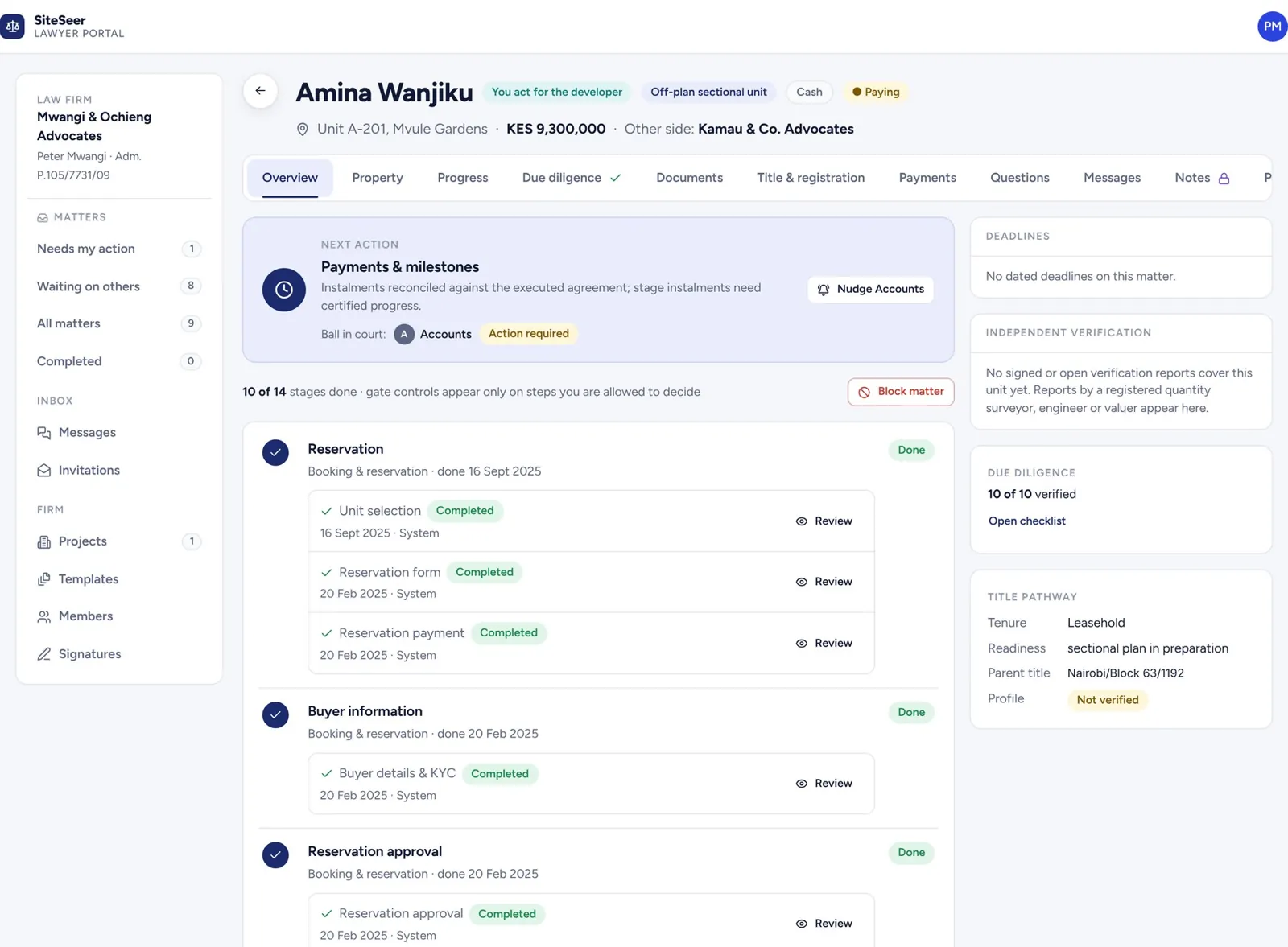
Each purchase opens as a matter for your advocate, with buyer, unit and price filled in. Due diligence, offer letter, sale agreement and signing share one workspace, and everyone sees whose turn it is.
From Sales to your advocate
The purchase moves onwithout anyone retyping it.
Each purchase in Sales opens as a matter in the legal workspace. Your advocate works in it; you and the buyer see whose turn it is.
A purchase opens a matter.
When a buyer reserves in Sales, a matter opens for your advocate with the buyer, unit, price and payment plan filled in. Nobody retypes anything.
Due diligence, with evidence.
Title, approvals and company searches are checked once per project and once per matter, each with who verified it and when.
Offer and sale agreement, versioned.
Drafts move between the advocates with a compare view of exactly what changed, until both sides approve.
Signed the way the law requires.
The advocate sets the execution procedure per document. Buyers sign with a one-time code, and every signed copy carries a fingerprint.
Released to the buyer's MyHome.
Executed documents are released to the buyer, and Sales sees the stage move without a phone call.
01 · Opens
The matter opens itself.
When the developer opens a purchase, it lands in your queue as a matter: buyer, unit, price and payment plan already filled in.
02 · Due diligence
Checks with their evidence.
Search, title route, seller authority, approvals and clearances. Each check carries its evidence and who verified it.
03 · Documents
Every version, compared.
Draft the agreement for sale from your template. A new version shows exactly which fields changed.
04 · Signing
You set how it is signed.
Choose the execution procedure for each document, including the witness present at signing. Each signature is recorded.
05 · Released
Sealed, fingerprinted, released.
The executed copy gets a SHA-256 fingerprint anyone can check. Release it, and the buyer sees it in MyHome.
MATTER · PTX-B504
Purchase of B-504 · Mvule Gardens
- Overview
- Due diligence
- Documents
- Signatures
- Release
Overview
- Buyer
- Amina Wanjiku
- Unit
- B-504 · Tower B · 5th floor
- Agreed price
- KES 14,500,000
- Plan
- 10 / 10 / 70 / 10
Filled in from the developer's purchase record
Due diligence
- Official search · parent titleEvidence pending Verified
- Sectional title routeEvidence pending Verified
- Seller authority (CR12)Evidence pending Verified
- Development approvalsEvidence pending Verified
- NCA project registrationEvidence pending Verified
- Land rent and ratesEvidence pending Verified
Agreement for sale · v1 → v2
- Completion date
- 30 Jun 2027
- Price
- KES 14,500,000
- Deposit
- 10% → 15%
- Special conditions
- Clause 9.2 added
- Parking
- 1 bay
2 changed · unchanged fields hidden
Execution procedure · set by you
- SellerMvule Developers Ltd · director Signed
- BuyerAmina Wanjiku · one-time code Signed
- WitnessPresent at signing Signed
Executed copy
SHA-256 fingerprint
Released to the buyer's MyHome
Anyone holding a copy can check it
Demo matter · fictional parties
Inside the workspace
Everything on one matter.For every party, in their own view.
Matters queue
Every purchase on your desk, with what needs your action, what is at risk and what is delayed.
Due diligence
Checks by matter or by project, each with its evidence and who verified it.
Documents & compare
Drafts, versions and a compare view that shows exactly which fields changed.
Signatures
A signature library for your advocates, and the execution procedure you set per document.
Payments
What the buyer has paid, and what is released for payment once the stage is reached.
Progress
The latest site session and the construction stage, from the developer's platform.
Registration
The title pathway to registration, with the registered title uploaded at the end.
Questions & messages
Questions from the buyer and the developer, kept with the matter.
Counsel notes
A private working file for advocates. The other parties never see it.
Projects
A legal profile per project, approvals and bulk upload of shared documents.
Templates
Your firm's templates for offers, agreements and letters.
Activity
Every step on the record, with dates, for when someone asks what happened.
SiteSeer is not a law firm. It coordinates the paperwork; your advocate acts under their own engagement and sets how each document is executed.
One connected system
Four apps carry one buyer.Follow them through.

Live with your buyersin two weeks.
Share your price list, unit types and payment plans. We load them, link your WhatsApp number, import the units you have already sold and switch on the replies.